March 6th, 2026
A round of reliability and polish across iOS and Mac. Better recording, smarter controls, and new privacy settings.
Voice Notes: More reliable recording, pausing, and syncing.
iPhone keyboard: Better retry behavior, app-specific mode handling, and external mic support.
Live Activities: Separate controls for Keyboard Dictation and Voice Notes.
Mac shortcuts: Smoother hands-free dictation, double-tap recording, and faster mode switching.
Context detection: More accurate app and window detection, especially in fullscreen.
Data & privacy: New settings section with clearer sharing controls and one-tap transcript deletion.
February 17th, 2026
Smart dictation that works wherever you do. Capture your best thinking on a walk, in the car, between meetings, or anywhere your mind is active but your hands aren't free.
Works inside any iOS app. Dictate directly into Messages, Slack, email, ChatGPT, Claude, Notes—wherever you're already working.
Transcribe meetings and monologues with Notes. Capture voice notes on the go, automatically transcribed and ready to send.
Synced from Mac. Your personal dictionary, custom modes, preferences, and settings carry over automatically.
Your account works everywhere. Paid users have full access on iPhone automatically—just log in with the account you use on Mac.
Wherever you're thinking, Monologue is there.
November 28th, 2025
Monologue v1.0.55 is here!
New Features
Sign in with Google: Use your Google account instead of email OTP
Sign in with Every: Every subscribers can now use their Every account
Import your dictionary: Migrating from SuperWhisper, Aqua Voice, or WhisperFlow? Import your custom words in one click
ChatGPT Atlas browser support: URL detection now works with Atlas
Bug Fixes:
Fixed the annoying space at the start of transcriptions
Fixed paste issues with Zed IDE and WezTerm
Improved WebSocket connection stability for faster dictation(still in closed beta)
Performance:
Optimized end to end pipeline for faster transcription response
Upgraded to our new streaming endpoint for better speed
November 12th, 2025
v1.0.54
Temporarily pausing the Faster Dictation beta for most folks while I fix stability issues. Thanks for trying it. Sorry for the bumps! A small test group will keep hammering on it until it’s solid again.
Brand-new Mic & Audio settings panel: live mic level meter, clearer device selector
Home dashboard refreshes automatically whenever you return to the app, so stats are always up-to-date.
Media pausing only targets apps that are actively playing (goodbye VLC hiccups).
November 5th, 2025
Monologue v1.0.52
Faster Dictation (Beta):
There’s a new dictation engine hiding in the sidebar toggle. Turn it on and longer recordings blaze through. Multi-minute clips are back in a second.
Every recording is still saved under the hood, so if anything glitches you can re-run it from "Transcripts" and never lose a dictation.
Known edge case: super short 1–2 second snippets can still finish without returning text. I’m on it, and the saved audio makes retrying easy.
Please send me bugs/feedback—this beta gets better the more I hear from you.
Bug Fix:
Resolved an issue that prevented text from pasting correctly into Sublime Text.
Thanks for helping me tune this beta!
October 31st, 2025
New Features:
Pause Media: Users can now pause audio instead of muting when starting a recording. Enable this in Settings > System > Media Interruption Behavior
Improved Paste Behavior: When dictation starts in one app and you switch apps, text will now be copied to clipboard instead of pasting randomly in other apps. If no active field is focused when you stop, text will also be intelligently copied to clipboard instead of requiring you to go back to transcripts to copy
Bug Fixes:
Fixed Monophone not displaying automatically for some users
Fixed Billing View not displaying for some users
Improved audio silence trimmer based on recent user feedback
Happy Halloween!
Naveen
October 22nd, 2025
What's New: Faster & More Accurate Local Model: Added new local transcription model that is significantly faster and more accurate than the previous ones. If you're using local transcription, I highly recommend downloading the new model in Settings → General. You can now delete the older models to free up space!
Help Us Improve (Optional): You can now opt in to share your transcriptions with us to help improve transcription quality. This is completely optional and can be toggled in Settings → Data & Privacy. Your privacy remains our priority.
Delete All Transcripts: Added a new option in Settings → Data & Privacy to permanently delete all your local transcriptions with one click.
Improvements:
Better Model Management: Redesigned the local model management interface with clearer download progress and model information
Improved Upgrade Flow: Better messaging when payment errors occur with quick access to upgrade options
Bug Fixes:
Fixed text rendering issues on macOS 26
Resolved screen capture permission handling in Privacy settings
Fixed Monthly activity view bug
Various UI polish and copy improvements
Recommended Action: If you're using local models, head to Settings → General and download the new faster model. Your transcription experience will be noticeably better!
October 10th, 2025
What’s new:
Adaptive silence trimming: We reworked the silent‑audio detector and now trim silence automatically to cut wait times and reduce hallucinated endings (like “thank you” or stray dictionary terms).
No silent‑audio notifications: You shouldn’t see those popups anymore—Monologue just handles the silence for you.
Toggle anytime: Settings > System > silence automatically
Team onboarding (beta):
We’re onboarding teams now and just onboarded a 10‑member team at MedScout. If you want Monologue across your company, DM me—beta spots are open and I’m iterating quickly.
Performance:
Ongoing speed and accuracy improvements
One bigger speed upgrade is in the pipeline. stay tuned
Please update to v1.0.49 and leave feedback. Your thumbs up/down really helps fine‑tune output.
Thanks for helping make Monologue faster and sharper
September 29th, 2025
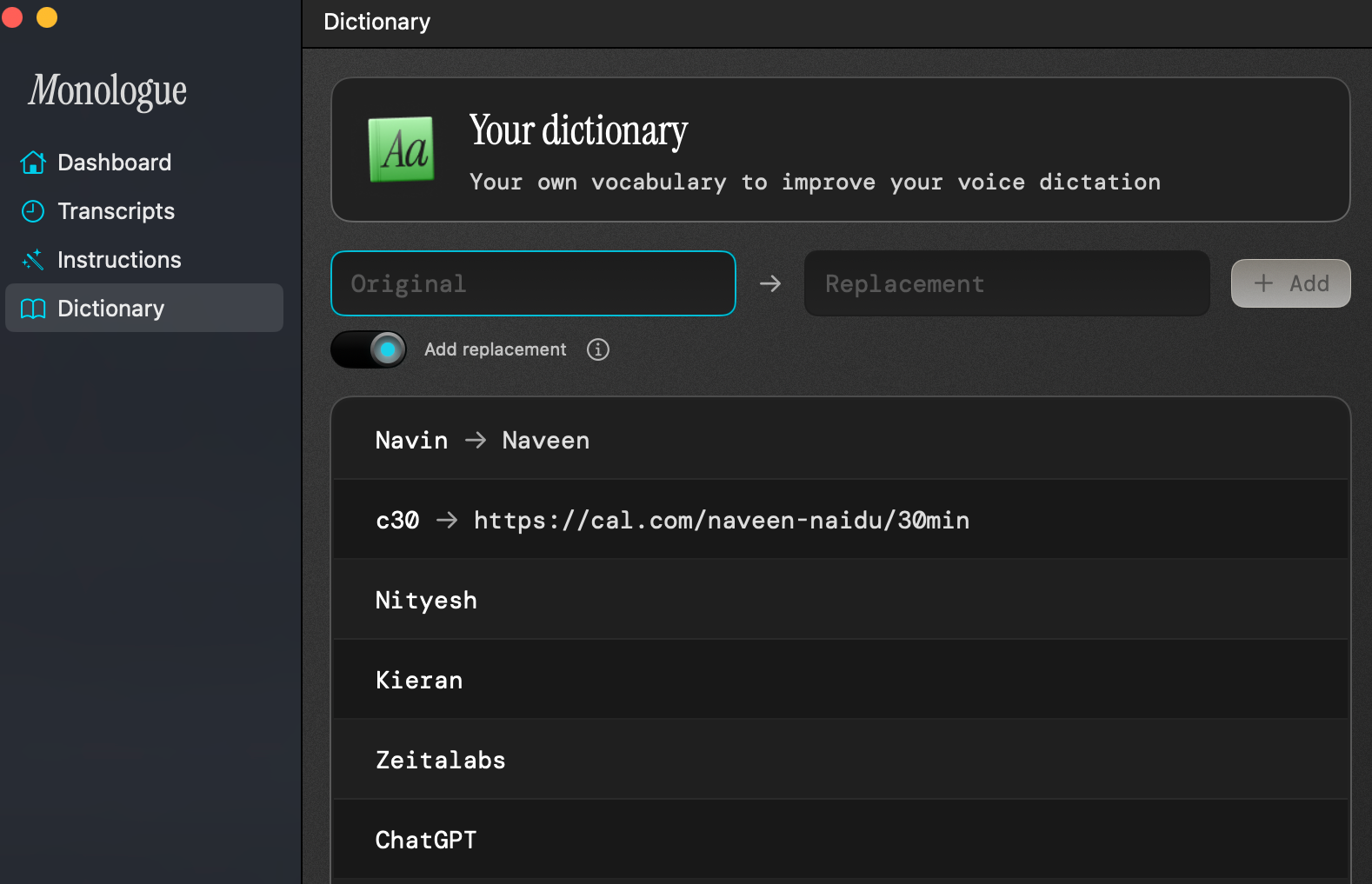
Introduces Word Replacements and a round of reliability fixes.
Improvements
Word Replacements: map misheard words/phrases to your preferred text
Dictionary: redesigned for quicker add/edit and better management
Comet browser: website detection support
Fixes
Hands‑free: no stray space when using the spacebar
Modes: you can now select a Mode when none was set (nil state)
Analytics: accurate Monthly Activity per day (timezone handling)
Downloads: clearer large model download error on macOS
Settings: fixed text inversion
Setapp: apps are now discoverable
Update to 1.0.47 to get these improvements.
September 16th, 2025
Today, Monologue officially launched to the public.
First, a big thank you. You’ve been using Monologue, giving us feedback, and shaping what it’s become—we truly couldn’t have built it without you.
Over the past few weeks, we’ve also made some big changes you may not have seen if you’re still using an older version:
Fresh onboarding
We redesigned onboarding with a delightful welcome experience, smarter model selection, and clearer tutorials to make getting started effortless.

To go through the onboarding again, click on Menu bar app > [three dots] > Reset onboarding
Massive latency improvements
We overhauled our transcription pipeline for our fastest, smoothest dictation yet.
If you haven’t updated, we’d love for you to try the new version.
A new home on the web: We also launched a brand-new website to showcase what Monologue can do.
Help us celebrate: It would mean the world if you joined us by retweeting Monologue’s launch announcement and sharing your own Monologue story.
We have bigger plans for Monologue, and as always, you'll be the first to try everything we build.
Thank you for being part of this journey from the start and helping us get here.